Change target group: Professionals
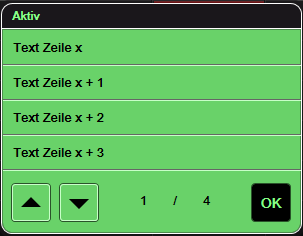
The function template is used to display lists which are available in text form.
Application examples:
• Display of a list of fault messages (realised with logic modules from the list input + list output folder in the graphic logic editor)
• Display of a list of alarm devices (realised with the HomeServer signalling system)
Notes:
• All the characters are displayed according to the Windows 1252 code page.
• Depending on the QuadClient resolution, the text length should be shorter than approx. 25 characters. Longer texts may be cut off and displayed with full stops at the end of the line.
• The maximum length of the list should be shorter than 100 entries.
• In the Android and iPad designs, there is an erroneous display in Designs 0 and 6 in connection with the apps. The cause is found in the apps and not in the function template.

Hard- und Softwareversionen: Gira HomeServer from version 4.1, QuadClient version 4.1
Kompatible Geräte: iPhone, Gira Control Clients
Gira Hardware: 1x 052900 Gira HomeServer 4 KNX
Bekannte Ausnahmen: In the Android and iPad designs, there is an erroneous display in Designs 0 and 6 in connection with the apps. The cause is found in the apps and not in the function template.
Realisierungsdauer: 0.5 hr.
